Automations

Follow-up that does not depend on memory.

Build coach-reviewed workflows for clients, leads, and business recovery.

Three lanes for follow-through.

Automations work best when they are tied to real coaching and business moments. Fitflux keeps those moments organized without turning your voice into a generic bot.

Client coaching

Keep onboarding, check-ins, overdue forms, inactivity, habits, and nutrition follow-up moving without making every reminder a manual task.

  • New-client onboarding
  • Missed check-ins and overdue forms
  • Habit, nutrition, and inactivity follow-up
Lead follow-up

Turn coach site submissions, checkout starts, intro-call bookings, and due follow-ups into clear next actions for the coach.

  • New lead alerts
  • Checkout recovery reminders
  • Booked-call and follow-up scheduling

Business recovery

Protect revenue workflows when purchases complete, fulfillment needs attention, payments fail, or trials are about to convert.

  • Purchase onboarding
  • Fulfillment review
  • Payment and trial follow-up
Inactive draft

From template to reviewed workflow.

Start from the patterns coaches repeat every week, then review the trigger, steps, timing, and tone before anything is active.

1

Choose a template

Start from onboarding, coaching, lead, nutrition, or business recovery patterns already shaped around Fitflux data.

2

Review the trigger

Confirm the event, target group, timing, and source before the workflow becomes active.

3

Edit the steps

Adjust messages, reminders, forms, notifications, waits, and follow-up scheduling to match your coaching style.

4

Activate when ready

Drafts stay inactive until a coach reviews the workflow and decides it is ready to run.

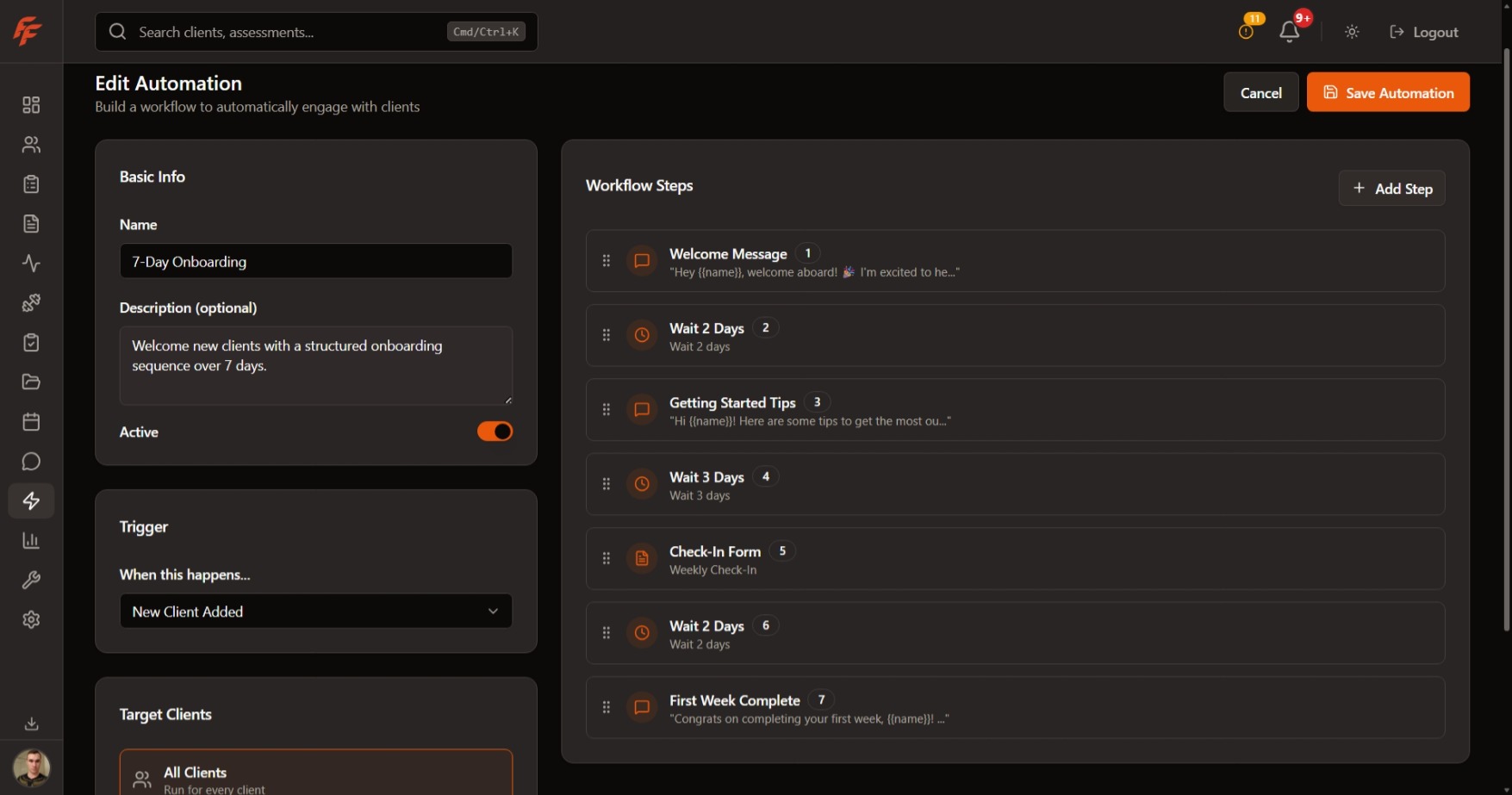
Workflow builder

Review, edit, then activate.

Coach controlled
Automations page screenshot showing the workflow editor, trigger setup, and sequence builder.

Automation ideas appear where the work happens.

Fitflux does not make you leave the workflow to remember what should happen next. The surfaces already tracking the issue can hand off to a reviewed automation draft.

Daily Review

When missed check-ins, overdue forms, inactivity, or low supplement adherence need a repeatable response.

Attention Center

When a recurring issue deserves an automation draft instead of another one-off reminder.

Trainer Marketing

When coach site leads, checkout starts, intro-call bookings, or due follow-ups need a clean next step.

Business Hub

When purchases, trials, payment failures, or fulfillment issues need timely recovery.

Operational health

Trust the system you activate.

Automations should make follow-up easier without hiding what they are doing. Diagnostics keep failed runs, waiting instances, and recent activity visible to the coach.

Failed runs

Spot workflows that need review before the client experience drifts.

Stuck waiting runs

See waiting instances that may need attention before they go stale.

Recent telemetry

Review started, completed, failed, and step-failure counts from recent activity.

Lifetime runs

Keep all-time automation activity visible alongside recent health.

AI-assisted coaching

Drafts with context, not unchecked outreach.

Fitflux can help draft the next coaching touchpoint from recent context, but the coach keeps the final say before an intervention is sent.

Review client context

Missed workouts, check-ins, nutrition, habits, and readiness signals stay attached to the follow-up decision.

Queue the reminder

Notifications and scheduled next actions keep the coach aware when a workflow needs attention.

Keep control visible

Templates, drafts, active state, and diagnostics stay visible instead of hiding behind black-box automation.

Give every repeatable follow-up a home.

Choose the platform plan that fits your active-client roster.

Join Waitlist